OCLint
关于 OCLint
Oclint是提高质量,减少缺陷检测C的静态代码分析工具,C++和Objective-C代码和寻找潜在的问题:
- 潜在的 bug - 空的
if/else/try/catch/finally语句- 未用到的代码 - 未用到的本地变量和参数
- 复杂的代码 - 高的圈复杂度,NPath复杂性和高系统
- 冗余代码 - 冗余的
if语句和 没用的括号- 代码气息 - 过长的方法或过长的参数列表
- 不良做法 - 倒逻辑和参数重新赋值
- …
安装 OCLint
1. homeBrew 安装(Mac)
$ brew tap oclint/formulae
$ brew install oclint
ps: 更新 OCLint
$ brew update
$ brew upgrade oclint
2.下载压缩包安装
下载完后解压,例如解压到 /Download.目录结构大致如下:
oclint-release
|-bin
|-lib
|---clang
|-----<llvm/clang version>
|-------include
|-------lib
|---oclint
|-----rules
|-----reporters
|-include
|---c++
|-----v1
即使没有安装,也能直接在bin目录下调用oclint。为方便调用,推荐将 OCLint 的 bin 文件夹添加到系统的 path中。具体步骤参见 http://docs.oclint.org/en/stable/intro/installation.html
OCLint 简单使用
创建一个 main.m 文件,内容如下:
int main() {
    int i = 0, j = 1;
    if (j) {
        if (i) {
            return 1;
            j = 0;
        }
    }
    return 0;
}
编译代码
$ CC -c main.m // step 1: 编译生成 main.o 文件
$ CC -o main main.o // step 2: 链接生成 main 可执行文件
$ ./main // step 3: 执行
$ echo $? // 输出 0 代表代码已经被成功的编译
我们做了两个连续的步骤来生成二进制代码,第1步编译代码,步骤2链接。我们只对步骤1感兴趣,因为它包含了oclint 所需要的所有编译器选项。这个例子中 编译选项是 -c,被分析的源文件是 main.m。
对单个文件进行分析
// oclint [options] <source> -- [compiler flags]
$ oclint main.m -- -c
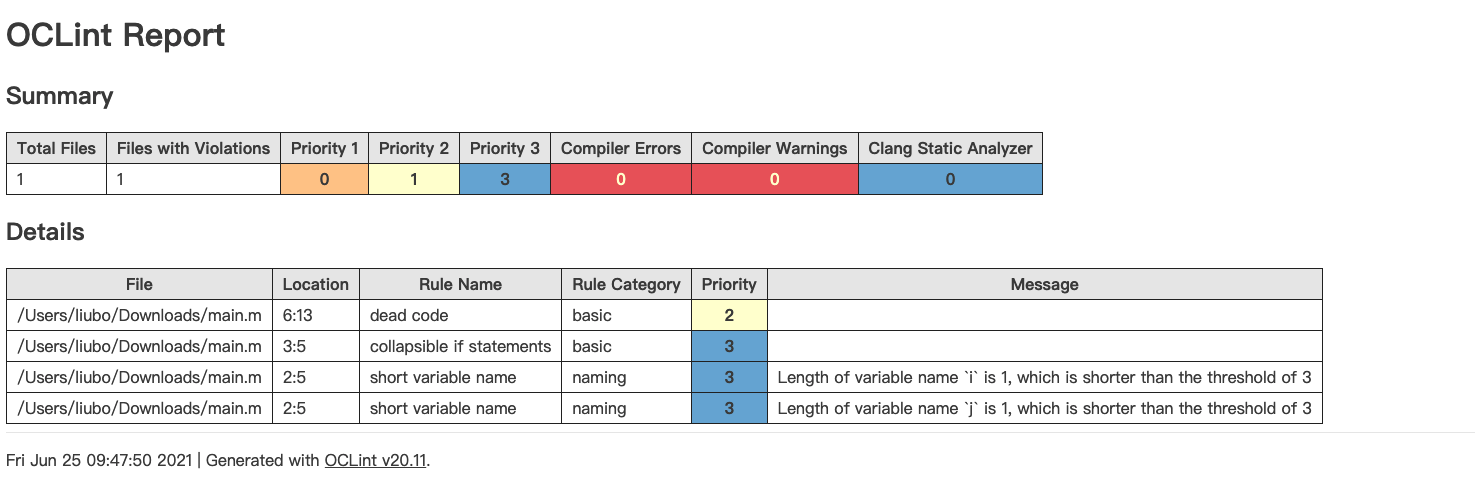
将分析结果以 html 文件输出:
$ oclint -report-type html -o report.html main.m -- -D__STDC_CONSTANT_MACROS -D__STDC_LIMIT_MACROS -I/usr/include -I/usr/local/include -c
对工程下的多个文件进行分析
当所有源文件共享相同的编译器选项时:
oclint [options] <source0> [... <sourceN>] -- [compiler flags]
然而当每个文件都可能有不同的编译选项,在这种情况下,通过读取 compilation database,oclint 可以识别源文件的列表,以及在编译阶段每次使用的编译器。它可以被看作是一个浓缩的makefile。所以在这种情况下:
oclint -p <build-path> [other options] <source0> [... <sourceN>]
oclint-json-compilation-database是 OCLint 中的一个非常方便的帮助程序。如果你要使用 OCLint 来分析整个工程,大多情况下,你将更多的与 oclint-json-compilation-database 打交道,而不是oclint。
对于在 Mac 平台上 使用 Xcode 的人,阅读Using OCLint with xcodebuild 和 Using OCLint in Xcode 这两个文档将非常有帮助。
Using OCLint with xcpretty
先决条件
背景
OCLint 通过 compile_commands.json 文件来找出每个文件的编译选项。对于 Xcode 用户,由于所有的编译选项都是隐式的在 Xcode 的 build settings 里被配置。在终端里调用 xcodebuild可以看到编译时真正发生了什么。我们的方法是捕捉 xcodebuild 输出日志,使用 oclint-xcodebuild 提取足够的编译器选项,将它们转换成JSON 编写的数据库格式,并保存到 compile_commands.json 文件。然后我们可以用 oclint-json-compilation-database 运行分析。
运行 xcodebuild
在工程目录下输入 xcodebuild -list 来获取到所有的配置
$ xcodebuild -list
Information about project "DemoProject":
    Targets:
        DemoProject

    Build Configurations:
        Debug
        Release

    If no build configuration is specified and -scheme is not passed then "Release" is used.

    Schemes:
        DemoProject
基于我们在 Xcode 里的设置,可以相应地设置 xcodebuild 的选项,现在开始编译 demoProject 工程:
// project
$ xcodebuild -target DemoProject -scheme DemoProject
// workspace
$ xcodebuild -workspace DemoProject.xcworkspace -scheme DemoProject
应该可以看到以 ** BUILD SUCCEEDED **结束的详细的 xcodebuild 调用信息。xcodebuild 的更多操作参见官方文档
安装 xcpretty
Flexible and fast xcodebuild formatter
xcpretty 以 xcodebuild 的输出作为输入,格式化之后输出。在这里我们用它来把 xcodebuild 的编译命令输出格式化为 json并保存到 compile_commands.json文件中,以方便进行静态分析。
$ gem install xcpretty
生成 compile_commands.json 文件
// project
xcodebuild -target DemoProject -scheme DemoProject | xcpretty -r json-compilation-database --output compile_commands.json
// workspace
$ xcodebuild -workspace DemoProject.xcworkspace -scheme DemoProject | xcpretty -r json-compilation-database --output compile_commands.json
xcpretty 默认将 compile_commands.json 生成到 ./build/reports/ 目录下。而我们希望它在工程的根目录下 所以添加了 --output $(pwd)/compile_commands.json 参数,将 json 文件生成到工程根目录。
进行分析并输出报告
$ oclint-json-compilation-database -- -report-type html -o report.html
在工程的根目录下会生成一个 html 文件。
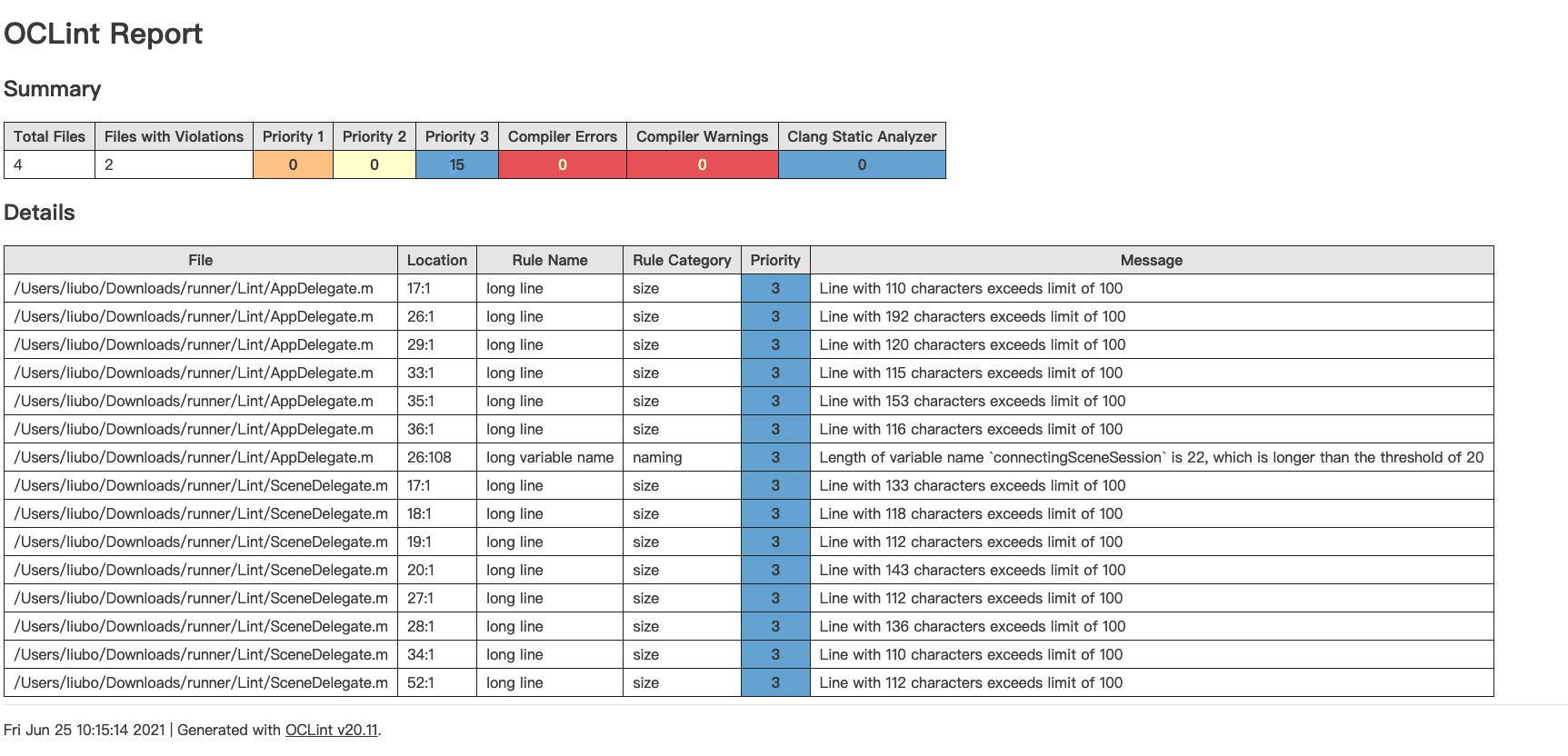
这种方式适合持续集成时在打包服务器上运行,每次打包前进行代码分析,将分析结果的 html 通过 webhook的方式推送到指定位置,并向相关人员发送消息。
脚本:
#! /bin/sh
if which oclint 2>/dev/null; then
    echo 'oclint exist'
else
    brew tap oclint/formulae
    brew install oclint
fi
if which xcpretty 2>/dev/null; then
    echo 'xcpretty exist'
else
    gem install xcpretty
fi
cd ${SRCROOT}
xcodebuild clean build -workspace DemoProject.xcworkspace -scheme DemoProject  | xcpretty -r json-compilation-database --output compile_commands.json
# - e Pods 排除 pods 文件夹
oclint-json-compilation-database -e Pods -- -report-type html -o report.html
Using OCLint in Xcode
官方文档 图文并茂不再重复。
分析规则
最新的OCLint中有71个检查的规则
主要对针对nil值的检查,cocoa 的 obj 检查,类型转换,空值的检查,简洁语法的检查,参数,size 和不使用的参数和变量的检查。
主要分为10大类:
Basic
Cocoa
Convention
Design
Empty
Migration
Naming
Redundant
Size
Unused
规则配置
一般可以这样配置规则 :
oclint-json-compilation-database -e Pods -- \
-report-type xcode \
-max-priority-3=15000 \
-max-priority-2=1500 \
-max-priority-1=100 \
-disable-rule=UnusedMethodParameter \
-disable-rule=TooManyMethods \
-rc NESTED_BLOCK_DEPTH=10 \
-rc LONG_VARIABLE_NAME=35 \
-disable-rule=LongClass \
-disable-rule=ShortVariableName\
-disable-rule=LongLine \
-rc MINIMUM_CASES_IN_SWITCH=2 \
-disable-rule=LongMethod \
-disable-rule=AssignIvarOutsideAccessors
在 -- 后面加上规则。但这样不是很直观。OCLint 支持配置加载。
有三种不同级别的配置文件:
系统配置文件:作用域是整个计算机系统内的所有用户的所有工程。创建.oclint 文件存放在$(/path/to/bin/oclint)/../etc/oclint目录下
用户配置文件:作用域是当前用户的所有工程,创建.oclint 存放在 ~/.oclint
工程配置文件:作用域是当前工程,创建.oclint 存放在工程根目录。
优先级:工程配置文件 > 用户配置文件 > 系统配置文件
在命令行中输入的参数会覆盖从配置文件中读取的参数。
配置文件中的语法为 YAML ,可设置以下参数:
| option | type | Mapping Command Option |
|---|---|---|
| rules | List of strings | -rule |
| disable-rules | List of strings | -disable-rule |
| rule-paths | List of strings | -R |
| rule-configurations | List of associative arrays | -rc |
| output | String | -o |
| report-type | String | -report-type |
| max-priority-1 | Integer | -max-priority-1 |
| max-priority-2 | Integer | -max-priority-2 |
| max-priority-3 | Integer | -max-priority-3 |
| enable-global-analysis | Boolean | -enable-global-analysis |
| enable-clang-static-analyzer | Boolean | -enable-clang-static-analyzer |
example:
disable-rules:
  - LongLine
rule-configurations:
  - key: CYCLOMATIC_COMPLEXITY
    value: 15
  - key: NPATH_COMPLEXITY
    value: 300
output: oclint.xml
report-type: xml
max-priority-1: 20
max-priority-2: 40
max-priority-3: 60
enable-clang-static-analyzer: false
禁止OCLint的检查
注解
消除一种规则的警告:
__attribute__((annotate("oclint:suppress[unused method parameter]")))
消除多种规则的警告:
__attribute__((annotate("oclint:suppress[high cyclomatic complexity]"), annotate("oclint:suppress[high npath complexity]"), annotate("oclint:suppress[high ncss method]")))
消除所有警告:
__attribute__((annotate("oclint:suppress")))
比如我们知道一个参数没有使用,而又不想产生警告信息就可以这样写:
- (IBAction)turnoverValueChanged:
    (id) __attribute__((annotate("oclint:suppress[unused method parameter]"))) sender
{
    int i; // won't suppress this one
    [self calculateTurnover];
}
对于方法的注解可以这样写:
bool __attribute__((annotate("oclint:suppress"))) aMethod(int aParameter)
{
    // warnings within this method are suppressed at all
    // like unused aParameter variable and empty if statement
    if (1) {}

    return true;
}
!OCLint
也可以通过//!OCLint注释的方式,不让OCLint检查。比如:
void a() {
    int unusedLocalVariable; //!OCLINT
}
注释要写在对应的行上面才能禁止对应的检查,比如对于空的if/else禁止检查的注释为:
if (true) //!OCLint
{
    // it is empty
}
分析报告导出
oclint 支持多种分析结果导出方式:html、json、 text、 xcode、XML 、PMD(Programming Mistake Detector)
参考: